Original sitemap
01 · SNAPSHOT
Project at a glance
An early class concept became a live web product.
ClickToResume began as an earlier resume-builder concept called BuildMyResume. I later rebuilt the project with a new identity, a more focused user experience, stronger responsive behavior, and a complete live website.
The current product combines a guided resume builder with live preview, flexible design controls, downloadable output, and supporting resume and job-search resources.
StatusLive websiteActive at clicktoresume.com
EvolutionBuildMyResume → ClickToResumeRebrand, redesign, rebuild, launch
RoleDesigner & developerUX structure, UI, front-end, testing
Core goalReduce frictionBuild without an account or surprise checkout
02 · EVOLUTION
From concept to product
Rebuild the experience, not just the name.
The original BuildMyResume project established the basic problem, information structure, and early visual direction. Revisiting it later gave me a chance to treat the project as a real product instead of leaving it as a completed class exercise.
I kept the useful foundation, then rebuilt the identity, interface, navigation, resume-building flow, responsive behavior, download experience, and supporting content around a clearer product direction.
Early wireframe
Earlier visual system
03 · LIVE EXPERIENCE
Current product
Keep the builder focused while the product does more.
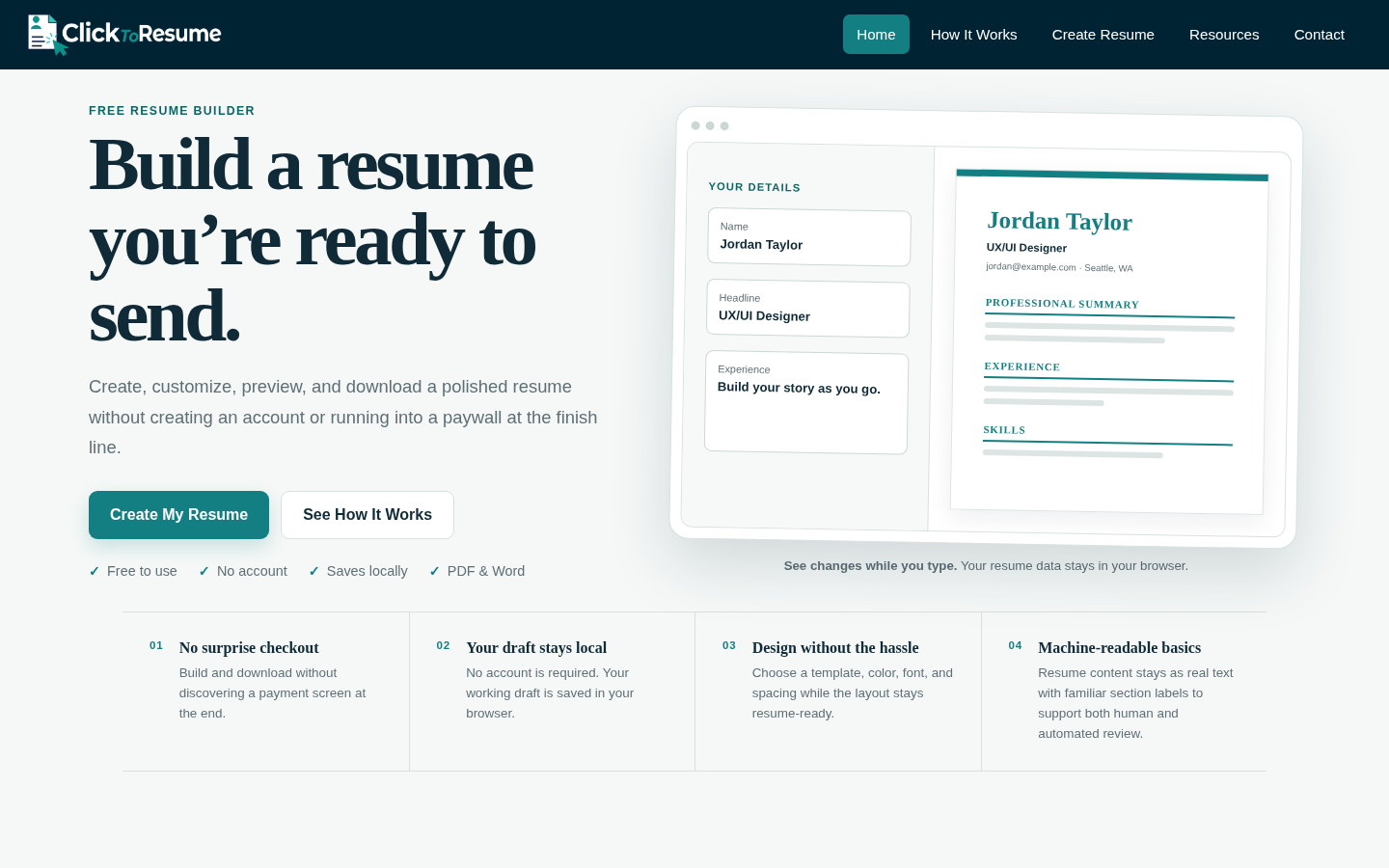
The current experience keeps resume creation at the center. Users can work through guided sections, see changes while they type, switch presentation styles without rebuilding their content, and download the finished resume as a PDF or editable Word document.
No account is required. The working draft is saved locally in the browser, keeping resume data out of an account system while still allowing users to return to their work.
 Current identity and live product direction
04 · PRODUCT DECISIONS
UX priorities
Remove the common barriers around resume builders.
The redesign focused on making the experience useful before making it complicated. Features were selected around the points where resume-building tools often create friction: setup, formatting, payment, privacy, and output.
Users can see the resume change as they enter and reorganize their information.
Four design directions, plus color, font, spacing, and section-order controls, let one resume adapt without starting over.
Resume content remains real text with familiar section labels to support both human and automated review.
The finished resume can be downloaded as a styled PDF or an editable Word document without a final paywall.
05 · RESOURCE ECOSYSTEM
Beyond the builder
Support the job search without crowding the tool.
ClickToResume expanded beyond the builder with a growing resource library. Keeping the guides on dedicated information pages lets the builder stay focused while users can still get help with the parts of resume writing and job searching that cause hesitation.
The resource library now covers resume structure, stronger bullet writing, summaries, limited work experience, resume length, tailoring, ATS-friendly formatting, job-search strategy, application follow-up, scam awareness, and other practical topics.
Explore the live resource libraryWhat to include, education, projects, summaries, length, and experience.
Bullet examples, tailoring, and clearer ways to communicate real experience.
Reading job postings, application strategy, follow-up, tracking, and scam red flags.
Users can build first and open supporting guidance only when they need it.
06 · BUILD & LAUNCH
Front-end development
Turn the redesign into a product people can actually use.
The finished project moved beyond a static portfolio concept into an active responsive website. I built and refined the front end, tested the builder and output, created supporting pages, and continued iterating after launch.
That progression made ClickToResume a stronger portfolio project because it documents not only visual design, but also product iteration, implementation, deployment, and ongoing maintenance.
Semantic structure for the builder, content pages, resources, and supporting site experience.
Responsive layouts, visual system, templates, navigation, and print-aware resume presentation.
Live editing, preview updates, customization, local draft behavior, and download-related interactions.
Published as a live site with ongoing usability, accessibility, content, and maintenance revisions.
